Decide which devices belong in the office total
Choose whether the total covers one device, one desk setup, or a measured work period. The useful comparison is between two deliberately chosen work setups, not between every load in a home.
The examples use visible assumptions so you can replace the device input, workdays, and rate with your own records instead of treating the numbers as device ratings or product advice.
Use this table to decide which shared devices belong in the office estimate. Include a shared device only when the question you are answering should carry that load.
Scroll horizontally to see all columns.
| Load type | Include by default? | Better input | Why it changes the estimate |
|---|---|---|---|
| Laptop or desktop | Yes | Device watts or device-only measured kWh | Main work device load |
| External monitor | Yes, when used for work | Watts x work hours | Repeats across workdays |
| Router or network gear | Optional | Include only if the office scenario should carry the shared load | Often serves the whole home |
| Lighting and small accessories | Optional | Simple watts x hours | Usually smaller than the main device |
| Variable desktop setup | Yes, but measure if possible | Measured kWh for the desk period | One all-day wattage can mislead |
Estimate or measure? Use watts and hours only when draw is reasonably stable in the selected mode. Laptop charging, workload, screen brightness, and sleep can all change draw; an adapter's maximum rating is not an all-day average. Use measured kWh when the load varies or when several desk devices share one compatible strip. For a variable setup, read how to measure appliance electricity use with a smart plug before pricing the measured period.
Two workday patterns, one comparison
Both examples use invented teaching inputs: device watts, accessory kWh, 22 workdays, and a rate of 0.19 per kWh. Amounts follow the currency used for that rate. Their purpose is to show which part of a selected desk setup changes the result most, not to report measured laptop or desktop performance.
Example A: laptop workday
- Laptop: 45 W / 1000 x 8 h = 0.36 kWh.
- Monitor: 25 W / 1000 x 8 h = 0.20 kWh.
- Router share: 10 W / 1000 x 24 h = 0.24 kWh, only when included in the desk boundary.
- Task light: 8 W / 1000 x 4 h = 0.032 kWh.
The selected laptop desk totals 0.832 kWh for the workday: about 0.16 for that day, or 18.304 kWh and about 3.48 across 22 workdays.
The router entry allocates its full 24-hour energy to each included workday, not just the eight working hours. Across 22 days it includes 5.28 kWh of router use and excludes all non-workdays. For an incremental work-only question, omit router energy that would be used anyway; for a full calendar-month total, count every day it runs.
Example B: desktop plus monitor workday
- Desktop computer: 150 W / 1000 x 8 h = 1.20 kWh.
- Monitor: 30 W / 1000 x 8 h = 0.24 kWh.
- Router share: 10 W / 1000 x 24 h = 0.24 kWh, if included in the desk boundary.
- Task light and simple peripherals together: 0.07 kWh.
The selected desktop desk totals 1.750 kWh for the workday: about 0.33 for that day, or 38.50 kWh and about 7.32 across 22 workdays.
Comparison result. The computer load explains most of the difference. The smaller accessories repeat in both patterns, so replacing a desktop input or measuring it has more effect than refining a task-light estimate.
Difference to investigate
The desktop pattern adds 0.918 kWh and about 0.17 per workday. Across the selected 22 days, the difference is 20.196 kWh and about 3.84. Replacing or measuring the desktop-computer watts is the first useful check; the repeated small accessories are not the main driver in this comparison.
Third-party dataset example: one computer interval
The cleaned REFIT dataset maps House 1 Appliance7 to Computer. From February 25, 2015 at
18:00:05 through 20:59:54 UTC, that channel contains 1,611 rows and 1,610 intervals. Practical Calculator Guide
did not measure this household or computer. Readings in the selected interval range from 23 W to 55 W; the
boundary excludes the whole-home aggregate, other monitored channels, and unmonitored loads.
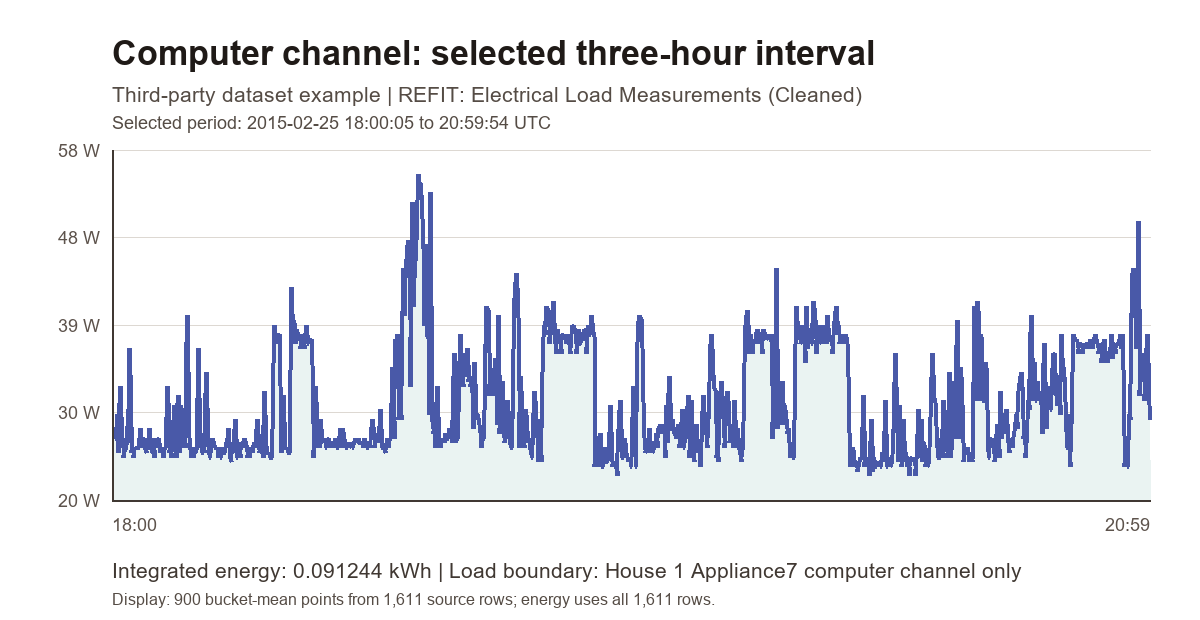
Applying each power reading until the next timestamp gives sum(power x seconds) / 3,600,000 = 0.091244 kWh. At the page's separate illustrative rate of 0.19 per kWh, the interval costs approximately 0.017336, or about 0.02, using the unrounded integrated kWh. The interval is 2 hours 59 minutes 49 seconds; its last reading closes the final interval. That result belongs to this nearly three-hour interval only; it is not a daily or monthly average.
What this interval cannot answer
The trace shows why one desk wattage can hide variation, but it does not identify the computer task. REFIT also warns that monitor assignments could change. Its cleaned-data documentation describes forward-filled gaps and values replaced with zero; the cleaned CSV does not mark those values row by row. Use the result for this named interval, not as a daily office average.
Change the highest-impact assumption first
A desktop can draw more during a heavy task and less during ordinary work or idle time. One all-day wattage can make the estimate look more precise than it really is. When that difference matters, measure the whole selected desk setup rather than inventing one average wattage.
- Set the desk boundary: decide whether a shared router, dock, printer, speakers, or lighting belongs.
- Replace a variable desktop wattage with measured kWh for the same desk period.
- Replace the illustrative rate with the rate you intend to price.
- Replace 22 workdays with the number of days represented by your question.
Use the comparison on your own desk
Use the Appliance Electricity Cost Calculator for stable watts and repeated workdays, or the kWh to Cost Calculator for a recorded desk period. If the rate or bill line item is unclear, start with How to Read Your Electric Bill for Calculator Inputs.
When a selected desk estimate and a bill do not line up, compare the bill structure separately in Why Your Electric Bill Is Higher Than the Calculator Estimate.